
With help from Good Things Foundation, a social change charity focused on closing the digital divide, we've put together guidance on supporting older people with digital technologies. You'll find tips on overcoming common barriers, advice on supporting older learners, and step-by-step advice on using a digital learning platform called Learn My Way, which covers a range of topics broken down into small and manageable guides and activities, from getting started on the internet to managing your money online.
We don’t expect you to complete a formal course of training in order to support older people with digital skills, but there are courses available if this is something you’re interested in:
- Good Things Foundation runs digital champions training that takes place across two interactive, online sessions, as well as a number of other relevant training webinars.
- Barclays’ Digital Wings programme includes a cost-free Digital Champions course designed to help participants support others. The course consists of three 90-minute online sessions that you’ll need to sign up to.
- iDEA (Inspiring Digital Enterprise Award) offers a cost-free range of ‘badges’ – short interactive modules – that you can work through at your own pace to build towards a bronze, silver or gold award. They have modules geared towards digital citizenship, employment-related skills, creative digital skills and entrepreneurship.
- You may already have completed the training on spotting scams and fraud of all kinds offered by Friends Against Scams after we partnered with them. You can also become a SCAMchampion.
Introducing digital skills to older people
Everybody is different: some older people use the internet but would like to learn more, some are curious about the internet but haven’t used it, and some are very confident internet users and are keen to help others. Some have no interest at all.
Tea party volunteers who took part in our pilot project often told us that things worked best if they simply mentioned that they’d be happy to help with digital skills or to ask if there was anything that their guests would appreciate help with.
A couple of groups had discussions about online shopping, however, and some guests who’d never been online spent time with volunteers’ tablets as an introduction. There’s advice on bringing digital skills into tea parties in the resources linked above, and tips on working with groups from Good Things and Age UK.
Good Things Foundation has put together a guide to helping older people use the internet that sets out some good advice on how to approach things. There are things in the guide that won’t surprise you – the need to be patient and reassuring, for instance – but some things, such as the best way to show someone how to do something on their tablet, may be new.
Some older people associate computers with work and/or worry about how easily they can learn new things. There’s a version of the above guide that focuses on playing games as a way to help people get comfortable with technology. You can also find links to some games and apps that might be of interest.
It’s a good idea to start with small activities that people enjoy. It could be searching for lyrics to a favourite song, using Google Streetview to ‘visit’ somewhere they know, or playing a word game. These activity cards might have something to suit your older person or group. Something as simple as taking photos at a tea party or activity group might help someone feel more confident about using their tablet or smartphone.
Having a reason to want to use digital technologies and knowing you’ll get something out of it is the sort of motivation that helps to make learning new things – especially things about internet safety – less daunting. In tea party groups who took part in our pilot project, one or two guests who’d no interest at the start became more interested when they saw how others used their devices.
Developing digital skills
Everyone has different needs and learning styles, so we’ve drawn together a range of resources to create different options.
Option 1: Learn My Way
Re-engage is part of the National Digital Inclusion Network run by Good Things Foundation; you can access structured digital skills support via their online learning platform, Learn My Way. It covers a range of relevant topics broken down into small and manageable guides and activities, from getting started on the internet to managing your money online. You can access topics in any order.
As well as written guidance, each topic has audio description, which may help people with visual impairments. Here’s an outline of how the site works and Good Things have also produced a guide to using Learn My Way with older learners. There’s a certificate template so that you can recognise people’s progress more formally if you / they want to – they don’t have to complete everything, you could use them for completing a single section if it feels appropriate.
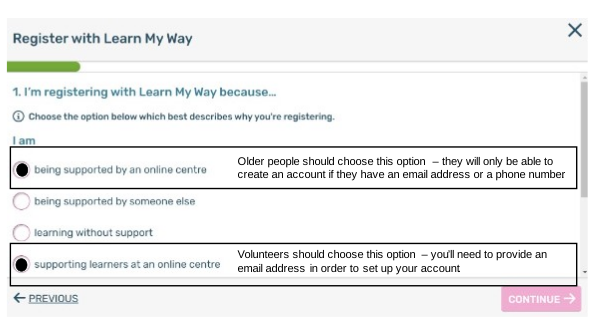
Volunteers can register on Learn My Way as supporters and older people can register as learners (see image); older people already using the internet may be comfortable creating their own account, but you may wish to sign up as a tutor to help someone who is less confident get started. Please ensure you follow these steps to register correctly as a Re-engage user, using centre number 8011228.
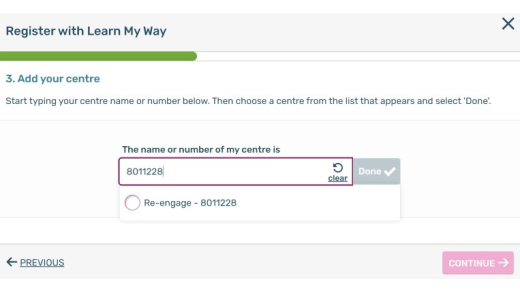
After entering your name, you’ll be prompted to ‘Add your centre’. You can either start typing ‘Re-engage’ – the charity’s name should soon appear for you to select – or enter our centre number, which is 8011228 (see image).
You can find a video guide to registering here.
Option 2: using other resources
Learn My Way offers a clear structure to each topic and includes short quizzes to confirm understanding, but there may be topics or people for whom that doesn’t feel like the best place to start. So, we’ve pulled together resources from a range of providers covering key topics and skills; on our resources page, you’ll find links to materials designed for beginners and some specifically for older people, as well as some information about the organisations behind those materials.
Essentials
It’s essential that you cover online safety and security with any older person you support: staying safe online is fundamental to digital inclusion. We recommend the following topics on Learn My Way: basics of online safety ; dealing with online scams; and making a good password. You can review Learn My Way and our resources page to find other elements of online safety that may be relevant depending on an older person's interests and activities.
Digital skills are increasingly essential to financial inclusion – meaning someone can access the best and most affordable products and services to suit their needs. You’ll find guides relating to money and finances on Learn My Way and our resources page, and, once someone is using the internet safely and securely, there are some simple yet transformational things you can support them to do (digital finances checklist).
If desired, you can acknowledge and celebrate an older person's progress in different ways.
You might find it helpful to keep a few notes from your conversations so that you can review these from time to time and see how someone is getting on and what they've achieved.
If you’re using Learn My Way, you can use their certificate template to mark any milestones that feel appropriate. We’ve also created a certificate to recognise completion of core online safety and security topics.
The government’s digital skills framework sets out six core areas of digital skills, beginning with foundation skills. According to Lloyds, just half of people over 75 can do all eight tasks at foundation level. You can use the printable checklists below to keep track of an older person’s progress in foundation skills and other areas. Once someone can do everything on a checklist, they can officially say they have the required digital skills in that area!
[Checklists: foundation skills, communicating, handling information and content, transacting, problem solving, and being safe and legal online.]